How to Auto-Write a Run of Chapters in PlotWrite (Step-by-Step, With the Catches)
How to auto-write a run of chapters in PlotWrite: Architect plan, your own API key, beat review, canon-check stops, and when Royal Road needs an AI tag.
PlotWrite is mainly the AI that reads your story, not the AI that writes it. But for authors who want it, Auto-write can draft a run of chapters from your story brain and Style DNA, and stop when it notices a contradiction.
- 1What do you need before you start Auto-write?
- 2Step 1: How do you set your voice in Style DNA?
- 3Step 2: Which model should Auto-write use?
- 4Step 3: How many chapters should you auto-write at once?
- 5Step 4: Should the AI plan the beats, or should you?
- 6Step 5: How do you review each draft?
- 7Step 6: Why does Auto-write stop on canon problems?
- 8Step 7: Do auto-written chapters need a Royal Road AI tag?
PlotWrite is mainly the AI that reads your story, not the AI that writes it. But for authors who want it, Auto-write can draft a run of chapters from your story brain and Style DNA, and stop when it notices a contradiction. This walkthrough covers the current flow, what you need before you start, and the catches, including Royal Road's AI tag. Treat it as a first-draft helper, not a way to skip the editing pass.
Want plotwrite.ink to draft your next chapter in your own voice?
What do you need before you start Auto-write?
Three things have to be in place.
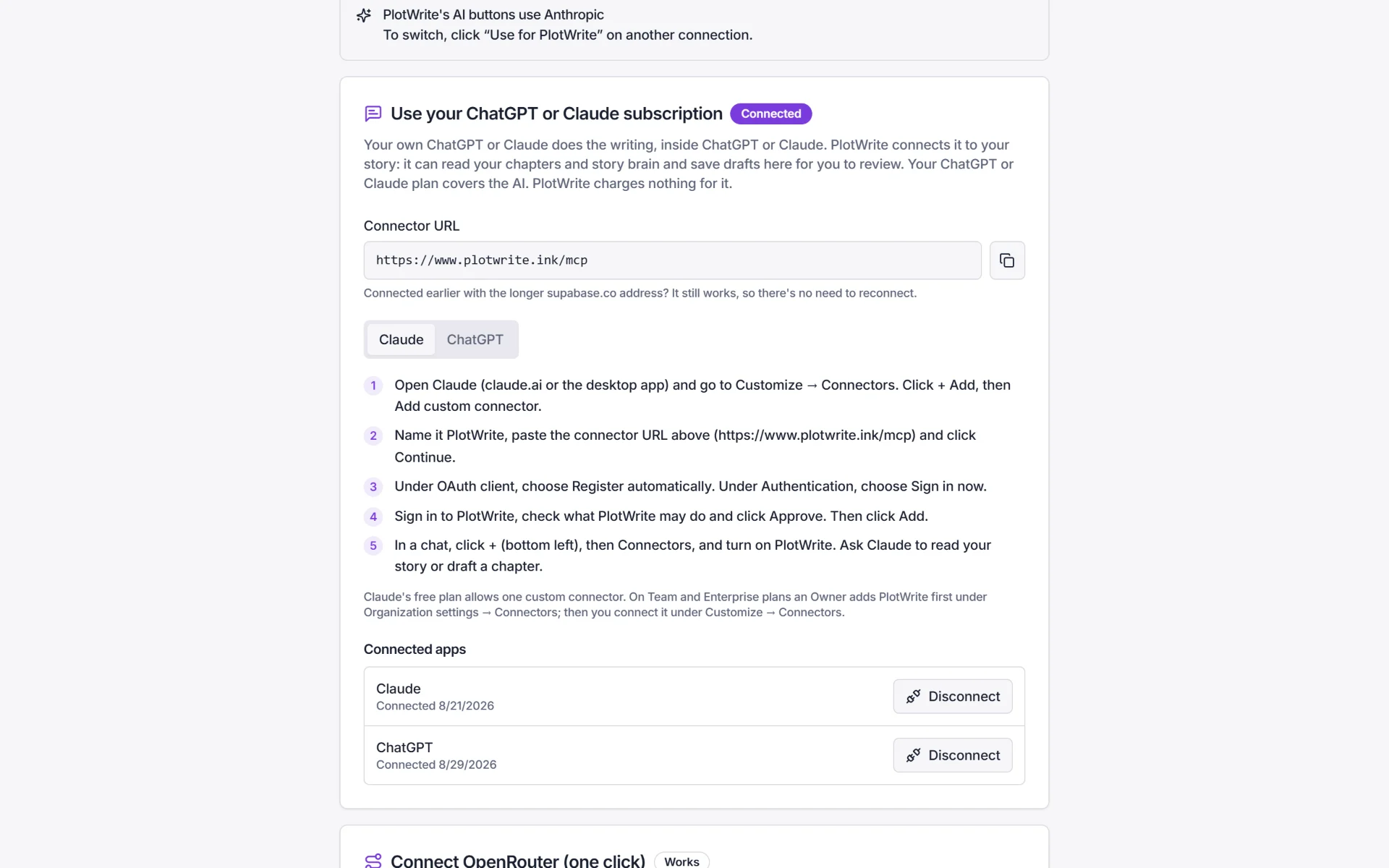
• The Architect plan. Auto-write is part of Architect ($24/month or $240/year). Every plan starts with a 7-day free trial, no card. • An AI connection that PlotWrite can call. Connect OpenRouter in one click, paste an API key (OpenAI, Anthropic, Google, Mistral, DeepSeek and others), or use a local model through LM Studio. The ChatGPT/Claude subscription connector does not work here, because Auto-write runs from inside PlotWrite and the connector only lets you draft in the chat. • A story brain worth drafting from. Auto-write is only as consistent as what it can read: your character pages, facts timed by chapter, threads and Style DNA. If you have chapters already, build the story brain from them first.
PlotWrite never provides or charges for AI. Your provider bills you directly.
Step 1: How do you set your voice in Style DNA?
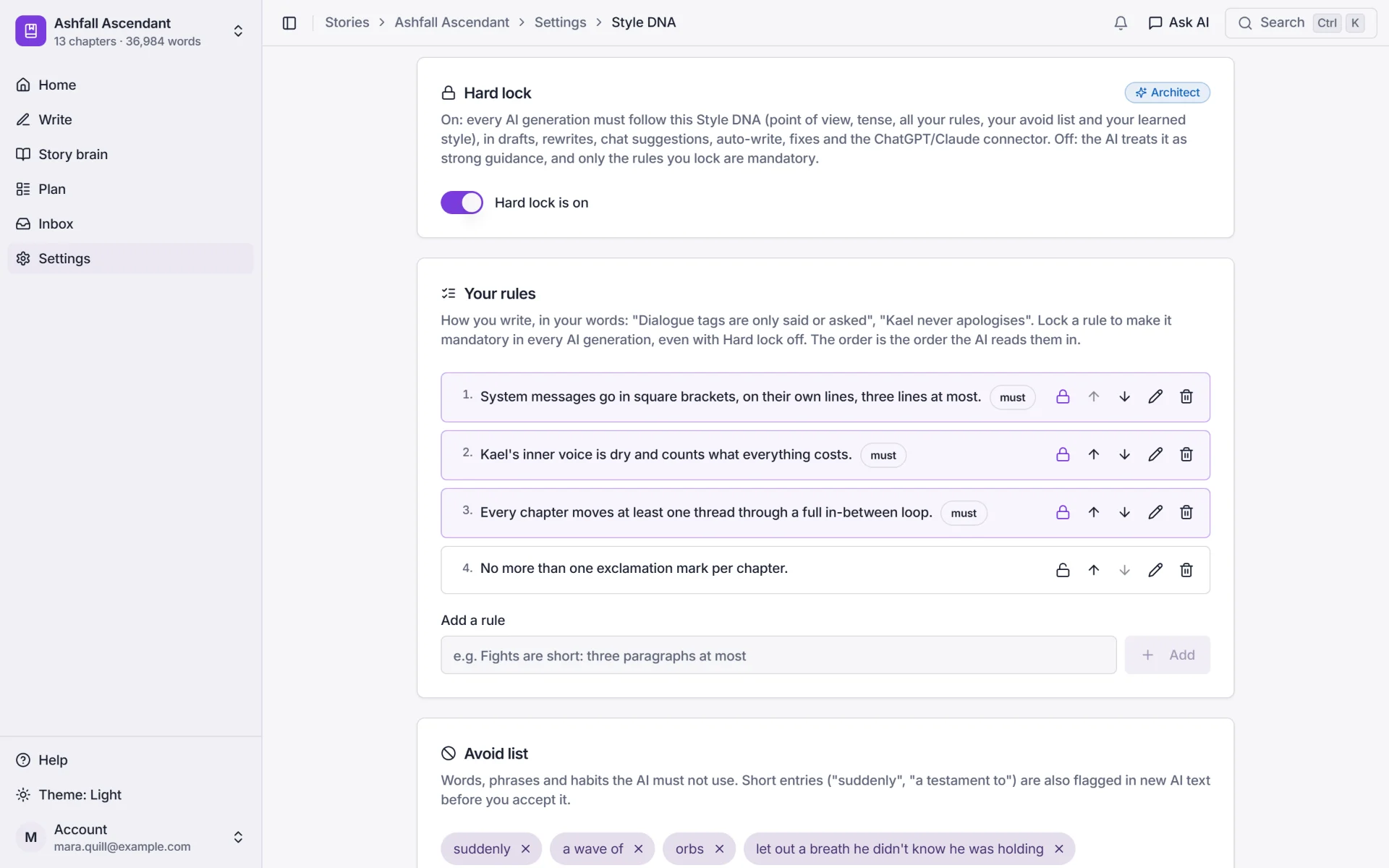
Open Style DNA and set your POV, tense, your own rules and an avoid list. On the Architect plan, PlotWrite can also learn a voice from chapters you have already written, and Hard lock makes every AI output follow it.
This matters more for a run of chapters than for a single draft. Voice drift compounds when nobody is reading each chapter before the next one starts. Fix the voice first, then draft.
Step 2: Which model should Auto-write use?
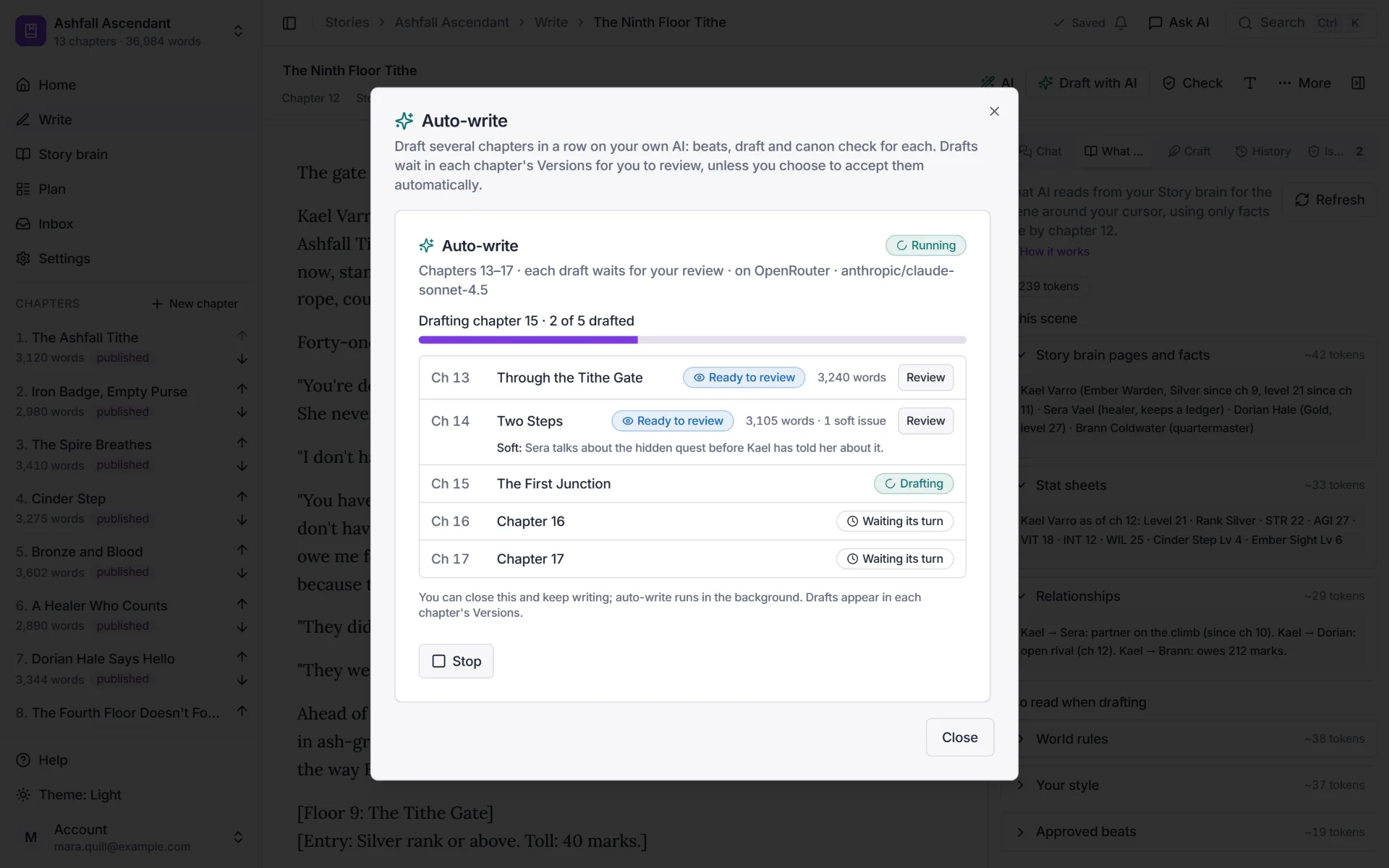
Open Auto-write from your story. Pick the model it should use. You can set a background model for long runs, or pass a specific model for this run. A faster, cheaper model finishes sooner and costs less; a stronger one usually writes better prose. Your provider bills the run directly, so choose with that in mind.
Step 3: How many chapters should you auto-write at once?
Choose the chapter to start from and the number of chapters to draft. Start small. Three to five chapters is enough to see whether the voice and continuity hold before you commit to a bigger run.
Auto-write reads the story as it stands, so the more of your outline, arcs and threads you have filled in, the better each draft lines up with where the story is going.
Step 4: Should the AI plan the beats, or should you?
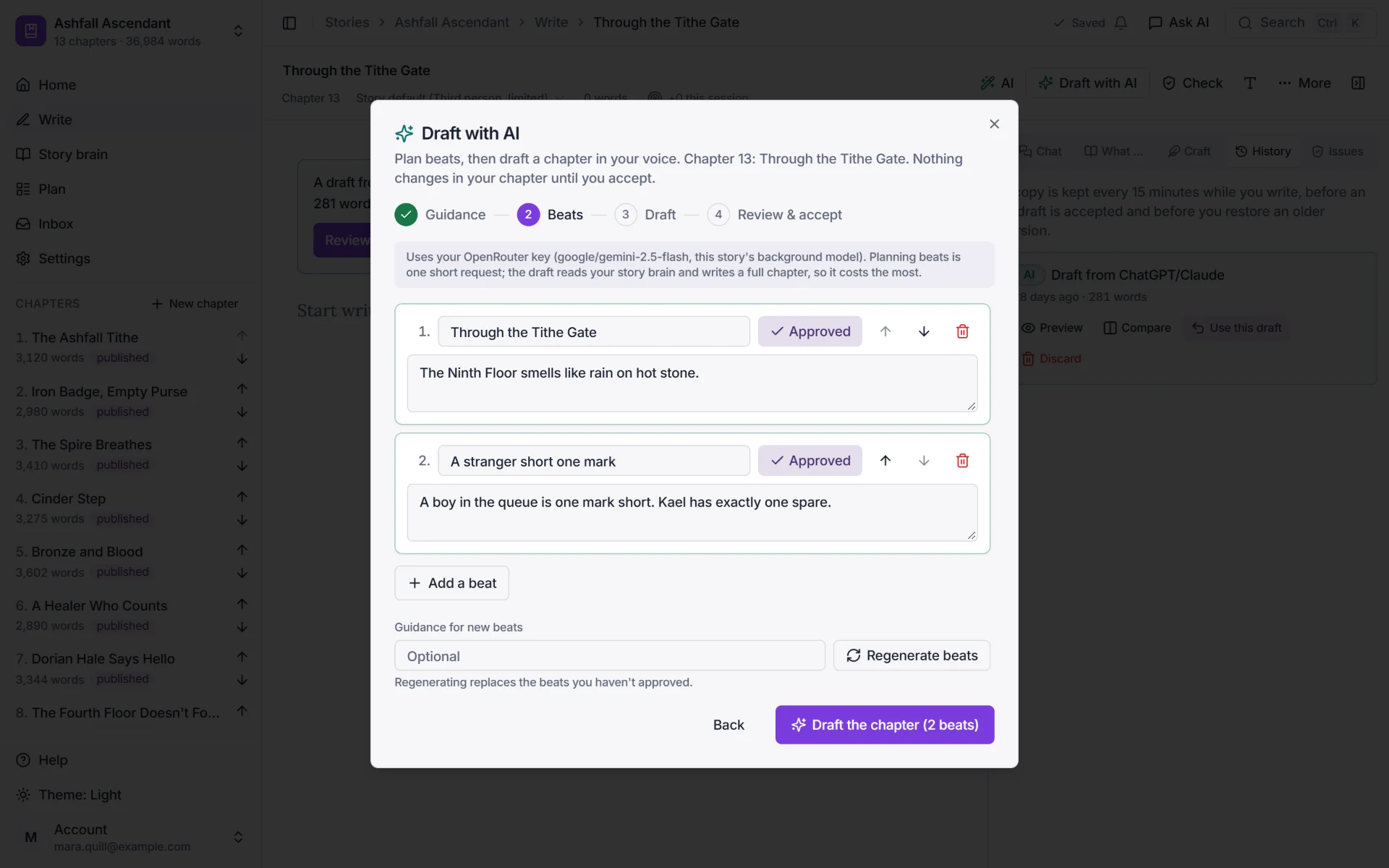
For each chapter, Auto-write either plans the beats itself or uses beats you have already approved. If you want control, write or approve the beats in Draft with AI first (plan beats, approve, then draft) and let Auto-write use them.
Letting the AI plan the beats is faster, but you give up the most important checkpoint: deciding what happens in the chapter.
Step 5: How do you review each draft?
Every draft waits for your review. Nothing enters your chapter until you accept it, and every change goes into version history. You can also switch on automatic accepting if you really want a hands-off run, but it is off by default for good reason: you are then trusting the draft without reading it.
An optional polish pass can strip common "AI-sounding" phrases, but it does not make a draft yours. Your edit pass still does that.
Step 6: Why does Auto-write stop on canon problems?
While it drafts, Auto-write checks each chapter against your story brain. If it finds a contradiction, such as a rank going backwards, a dead character walking, or a brother becoming a cousin, the run stops instead of piling more chapters on top of the mistake.
Open Check chapter to see the canon check, with both quotes side by side and a one-click fix previewed as a diff. Fix it, then continue. This is the main reason to run Auto-write on a story brain rather than on a blank page.
Step 7: Do auto-written chapters need a Royal Road AI tag?
Royal Road's AI policy treats planning, memory and consistency checks as back-office help that needs no tag. Pasting AI-written prose into a chapter is different: Royal Road asks you to apply an AI tag (AI-Assisted or AI-Generated). If you publish chapters that Auto-write drafted, tag the story.
We cover the exact wording in the related guide linked below, Royal Road AI tag rules explained. If you would rather never touch any of this, Tag-free mode hides every tool that writes prose for you.
plotwrite.ink drafts serial-ready chapters in your voice and builds your story bible from your chapters. Start your 7-day free trial →
When does Auto-write make sense, and when does it not?
It can help when you have a clear arc, a filled-in story brain and a fixed voice, and you want first drafts of a short stretch to edit. It is a bad fit when you are still discovering the voice, when the chapter is a key turning point, or when you plan to publish without reading.
The cautionary version is in our post-mortem, 'I AI-Drafted 81,381 Words in a Week on Royal Road' (linked below): speed was easy, consistency was the problem, and readers caught the slips.
How do you get a better Auto-write run?
1. Build the story brain first. Character pages, facts timed by chapter and threads are what the canon check compares against.
2. Start with a few chapters. Read them closely before asking for more.
3. Approve the beats yourself for the chapters that matter.
4. Keep auto-accept off until you trust the output on your own story.
5. Run the Check chapter sheet and the Continuity report after a batch. The report lists contradictions, drifting stats, promises still waiting and roles that flip, with the top five to fix first.
Frequently asked questions
Can Auto-write really draft many chapters in one go?
It drafts a run of chapters from the start chapter and count you choose, on your own AI. But each draft waits for your review unless you switch on auto-accept, and the run stops if it finds a canon problem, so it is rarely a fire-and-forget batch.
Does Auto-write work with my ChatGPT or Claude subscription?
No. It needs an API key, OpenRouter or a local model. The subscription connector lets you draft in the ChatGPT or Claude chat and review the draft in PlotWrite, but the AI buttons inside PlotWrite, including Auto-write, need a key or local model.
What if the AI goes off the rails?
The run stops on canon problems, and nothing enters your chapter without Accept. Every change goes into version history, so you can roll back. Reading the first drafts early catches drift before it compounds.
Do I need an AI tag on Royal Road?
If you paste AI-written prose into a chapter, Royal Road asks for an AI tag. Memory, planning and consistency checks count as back-office help and do not. See the AI tag rules explainer for details.
How much does an Auto-write run cost?
PlotWrite never charges for AI, so there are no credits. Your provider bills the run directly, and the cost depends on the model you pick and how many chapters you draft. A short test run of three to five chapters shows you the real cost first.
Which plan includes Auto-write?
Architect ($24/month or $240/year). Every plan starts with a 7-day free trial with no card.
Skip the blank page. Let plotwrite.ink draft your next chapter.
plotwrite.ink learns your writing style, keeps track of your characters and world rules, and can draft the next chapter in your voice with your Claude or ChatGPT plan or your own AI key. Built for Royal Road, Wattpad, and serial authors who post weekly.
- No credit card
- Cancel anytime
- Full Architect access
- Works with your Claude or ChatGPT plan or your own AI key
Quick answers from this guide
Direct one-page answers to the most-asked questions on this topic.
Start writing your web serial today
plotwrite.ink builds your story bible, tracks your progression systems, and flags contradictions — so you can focus on writing the story that earns you readers and income.
Start your free trial — 7 days, no card needed