Step 1 — How do you plan a serial with PlotWrite?
Most authors start with a vague concept. In Plan, the Outline has board and list views and arcs, and a brainstorm chat docked beside it knows your story. Talk through a 50-word premise, then use "Save as idea" to keep what's worth keeping.
Every beat stays editable and nothing is written into your chapters for you. This is the first place you save real time: planning that used to sprawl across notes lives next to the outline.
Step 2 — How does the Story brain keep up while you write?
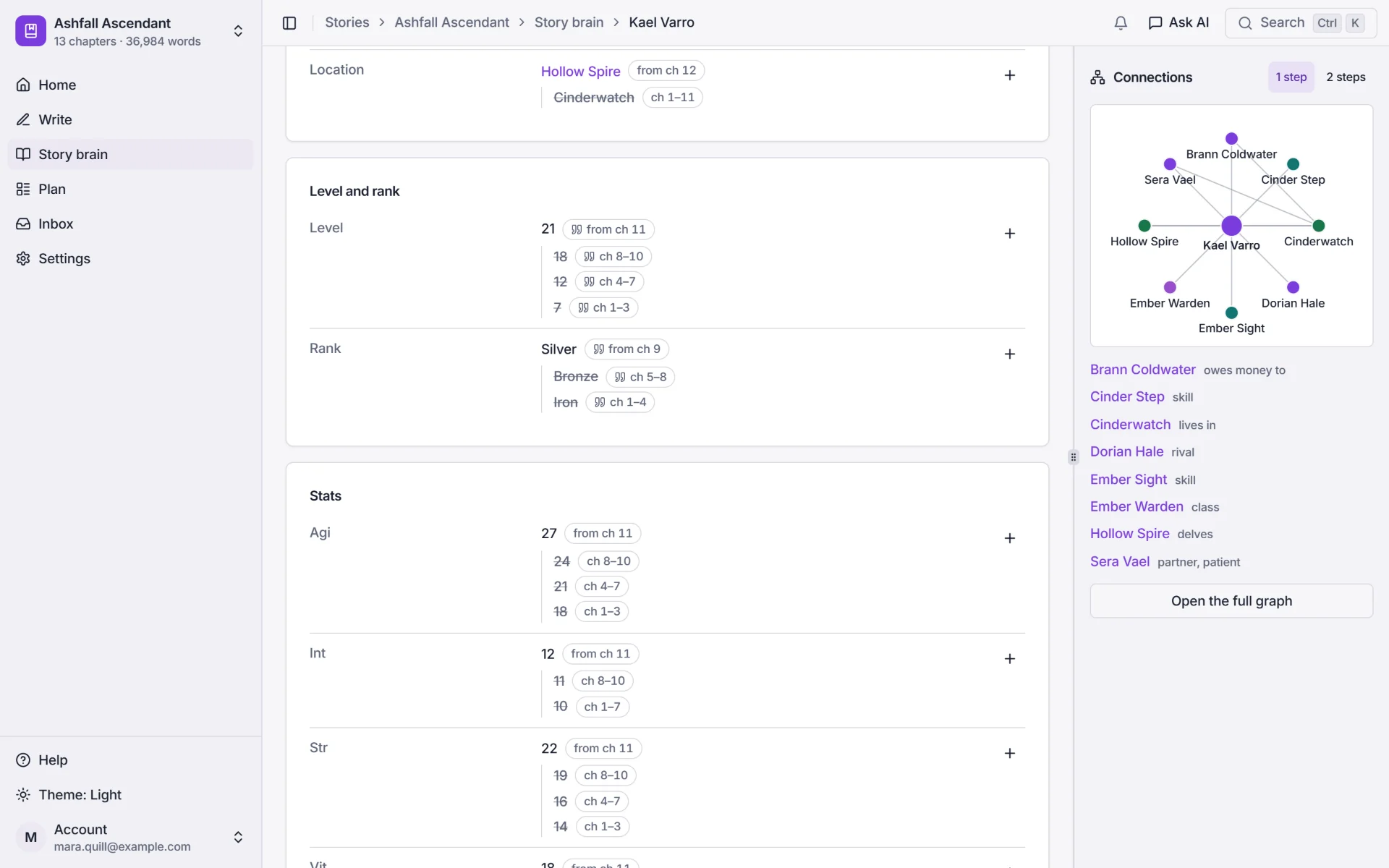
PlotWrite builds your Story brain from the chapters you've already written, by reading them on your own AI. You get a page per character, place, item, skill and faction, with [[links]], a graph and a timeline.
There's no manual data entry. Facts it proposes from your chapters wait for your approval in the Inbox. Facts are timed by chapter ("Silver rank from ch 9"), so LitRPG stat sheets can show any character as of chapter N, and what changed since the previous chapter. For more, see how to track LitRPG stats.
Step 3 — How do you stop plot threads going quiet?
Open Plan → In-Between to see your threads: every A→B line the story moves along, such as the main plot, a romance, a rivalry or a mystery. It shows the beats that moved each thread chapter by chapter and warns when a thread goes quiet.
"Plan the in-between" helps you map the path from A to B, so the promises you made readers don't get lost in a 200-chapter run.
Step 4 — How do you catch continuity slips before publishing?
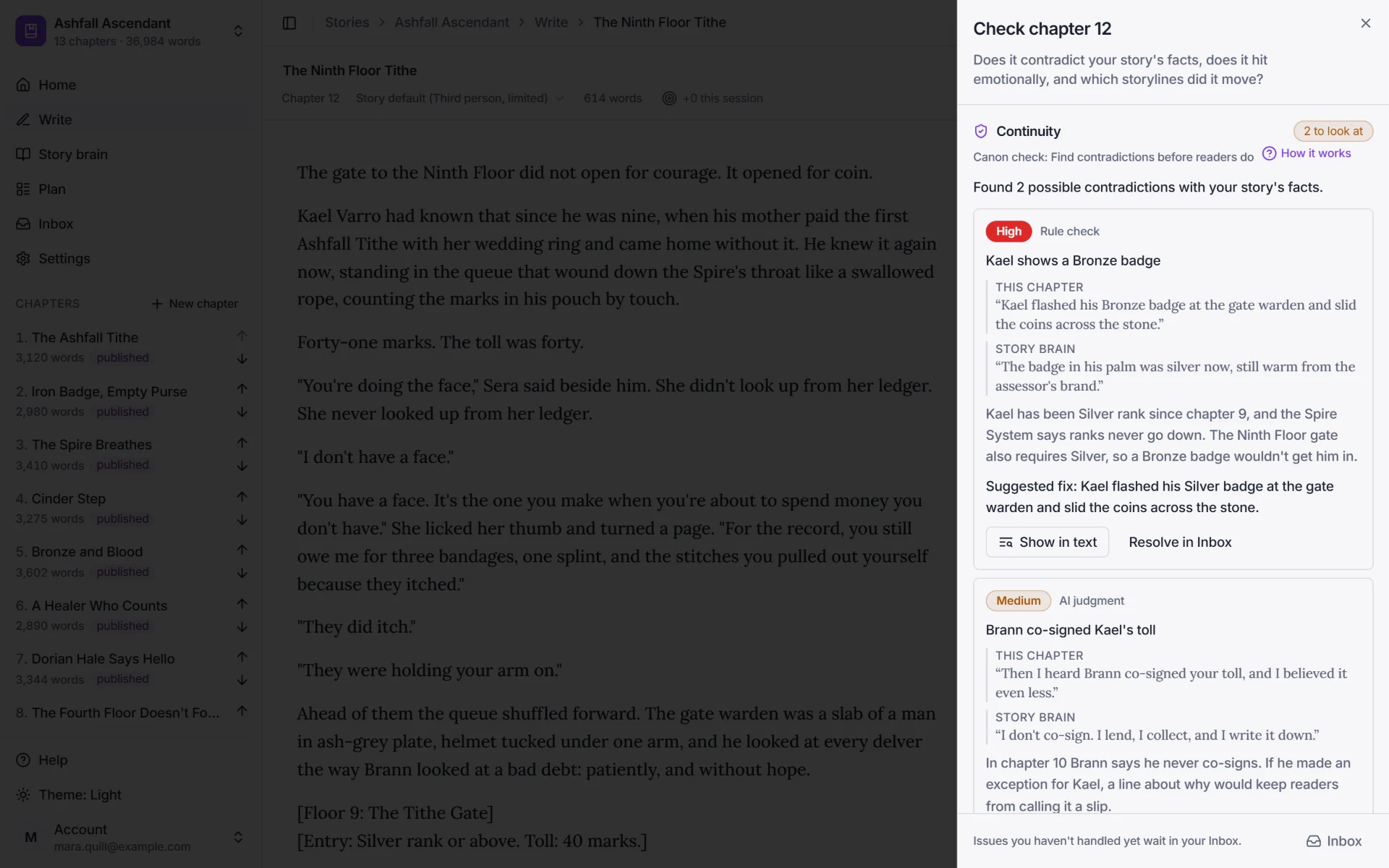
Before you copy-paste a chapter to Royal Road, open the Check chapter sheet. It has three parts: Continuity (canon check), Heart (Soul check) and Threads. Canon check flags things like:
• A rank going backwards or a stat that drifted • A dead character walking • A brother quietly becoming a cousin • The wrong location for a scene
Each issue shows both quotes side by side and offers a one-click fix previewed as a diff. Fix what's real, publish clean. Readers notice these slips faster than you'd expect.
Keeping a long serial straight is the hard part. PlotWrite remembers every rank, skill and secret in your story and checks each new chapter before you post. Works with the Claude or ChatGPT plan you already pay for. Free for 7 days.
plotwrite.ink learns your writing style, keeps track of your characters and world rules, and can draft the next chapter in your voice with your Claude or ChatGPT plan or your own AI key. Built for Royal Road, Wattpad, and serial authors who post weekly.
- No credit card
- Cancel anytime
- Full Architect access
- Works with your Claude or ChatGPT plan or your own AI key
Ready to try it on your own serial? Start your 7-day free trial
Step 5 — Does using PlotWrite require an AI tag on Royal Road?
Style DNA holds your POV, tense, your own rules and an avoid list. On the Architect plan it can also learn a voice from your chapters, and Hard lock makes every AI output follow it.
Drafting tools (Draft with AI, Auto-write) exist but are optional, and nothing enters a chapter without your Accept. Royal Road's policy treats memory, consistency checks and planning as back-office help, so no AI tag is needed. Pasting AI-written prose into a chapter means Royal Road asks for an AI tag. Prefer to be sure? Tag-free mode hides every tool that writes prose for you. See the Royal Road AI policy page for details, or the guide to Royal Road AI tag rules.
What this means for your serial
Long serials usually don't fail on ideas. They slip on consistency and consistency costs time. PlotWrite works on both:
• Cadence: less time hunting through old chapters to check a rank, a date or a name means more time writing. • Quality: cleaner continuity means fewer reader comments pointing out slips, which protects ratings and the trust your binge readers give you.
Whether that turns into Patreon income depends on your story, your audience and your pace. The 7-day free trial lets you test it on your own serial.
Recommended companion reading
Before you start: read the Royal Road Patreon income breakdown to set realistic expectations. Read the cliffhanger formula to make sure your chapter endings are converting. Read the speed guide to understand the recovery cadence that prevents burnout. All three are linked below.